YOUR PRESEASON STARTS HERE

Be ready before
the first flake.

Bring your customers. Build your routes. Get your crew comfortable. Plowdesk helps you turn a preseason to-do list into a business that is ready to roll.

Imports. Bulk setup. Real people to help you finish.

01 / START WITH WHAT YOU ALREADY HAVE

Your customer list.
A head start on winter.

You should not have to retype your business to get started. Bring your existing information into Plowdesk, then review it before it becomes your working customer and property list.

CSV

Bring your spreadsheet.

Use the Plowdesk CSV format for customer names, emails, phone numbers, addresses, and property details. It gives your existing list a clear path into the app.

Review records, edit missing or incorrect details, and approve the rows you want to import. Keep the import-results report for your records.

QUICKBOOKS ONLINE

Bring your QBO customers.

Export your customer list to Excel in QuickBooks Online and upload the original Customer Contact List .xlsx file. Plowdesk uses it to prepare customers, properties, and their primary-contact relationships.

Shipping addresses are preferred for service locations, with billing addresses used when needed. Flagged addresses and duplicate customers stay visible for review.

Up to 500 customers and 5 MB per file. Customer/property import only: no quotes, invoices, services, or additional contacts. No live accounting sync.
You stay in control of the import.

Approve ready records. Correct flagged rows. Review the results. If the file is messy or comes from another system, let us help prepare it.

02 / DO THE REPETITIVE WORK IN BATCHES

Bulk add. Review. Edit.
Move on with your day.

Build out your season across selected customers and properties. Make corrections in the review steps and tailor pricing where the work differs.

01

Properties

Create properties for selected customers in a batch. Review proposed names and addresses, edit the records that need attention, and approve the setup.

02

Services & pricing

Add seasonal, as-needed, or material services to multiple properties. Set pricing for each property as part of the batch workflow.

03

Attributes & tags

Apply an existing attribute or tag across selected properties, or create one as you go. Organize the details your team uses in the field.

04

Route stops

Add multiple properties to a route template in one workflow. Review the stops and get your repeatable storm plan ready.

Bulk setup includes review and editing within each workflow. Importing a file does not overwrite existing customers; duplicate records are flagged for attention.

03 / TURN THE DATA INTO A STORM PLAN

Ready means more
than a full address book.

Get the agreements right.

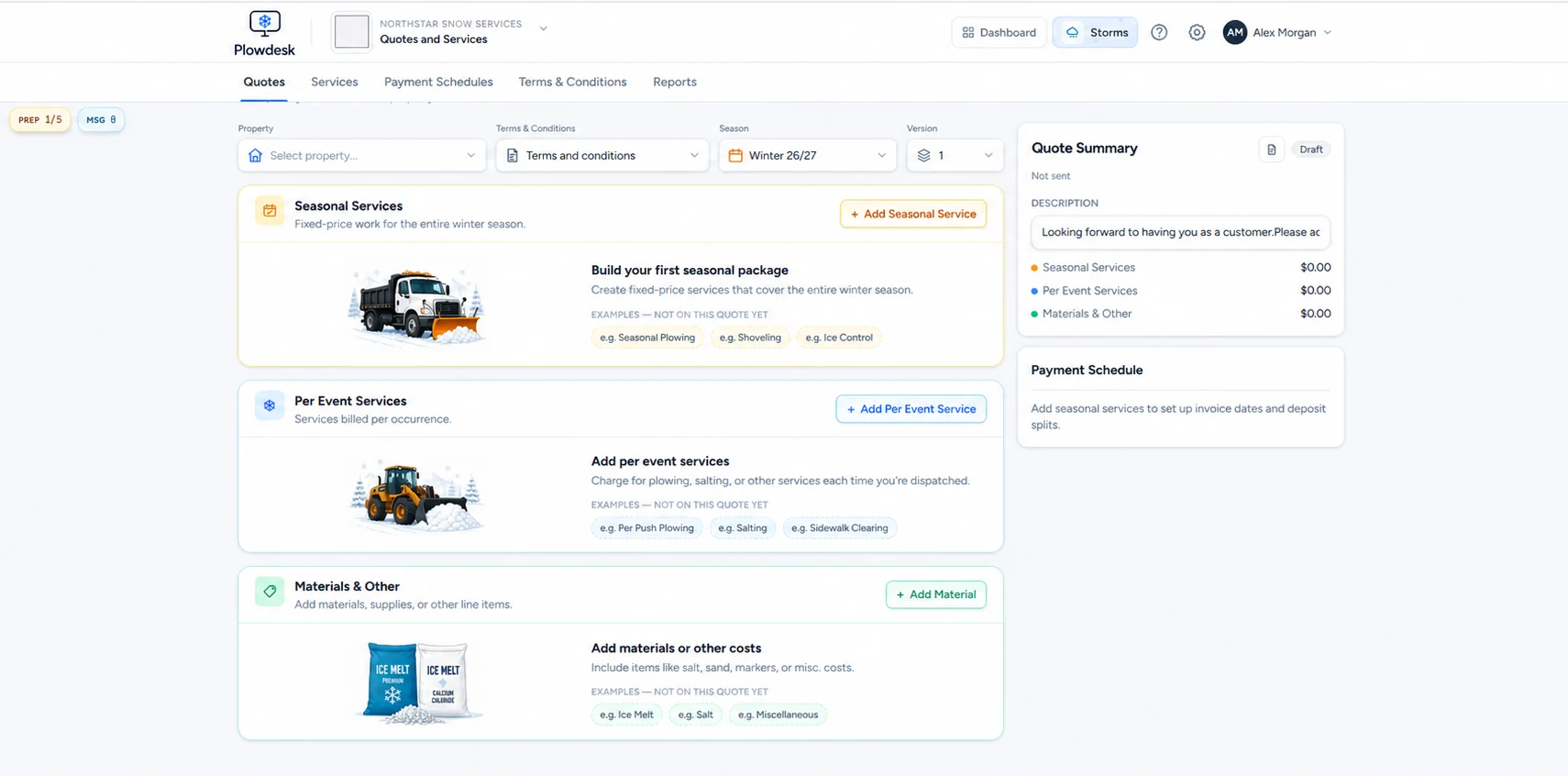
Prepare seasonal, per-event, and per-inch quotes, materials, terms, and scheduled payments. Collect online acceptance and keep the service setup tied to the property.

Explore quoting & billing ↗

Build routes you can use again.

Save route templates, review stop order, and put your properties into a repeatable storm workflow. Plan how drivers will share the work before the weather arrives.

See storm routing ↗

Get the crew and office on the same page.

Have drivers practice the mobile workflow: find a stop, review site details, record service, and attach photos. Walk the office through service records, charge review, and invoicing.

Explore the mobile app ↗

Refresh customer details before you need them.

Use customer information-update links to collect current details. Review property instructions and service addresses while there is still time to fix them.

Plowdesk quote builder showing seasonal services, per-event work, materials, and scheduled payments
Prepare the agreement before you prepare the first storm. Anonymized product example.

04 / A REAL PERSON. YOUR QUESTIONS.

Free, live,
one-on-one training.

Book a 30-minute session and work through Plowdesk with us. Bring the way your business actually operates: your properties, your pricing questions, and your route setup.

Book my free training ↗

Make the session yours.

  • Walk through an import and review flagged records.
  • Set up properties, services, and pricing.
  • Build a route and practice the storm workflow.
  • Connect quoting, field records, and billing.
  • Work through the questions holding up your launch.

Bring a short list of priorities. We’ll use the time where it helps you most.

THE SWITCH SHOULD NOT BE THE HARD PART

Moving from another system?
We’ll help. For free.

You do not have to figure out the move alone. Our free migration help includes real, hands-on support from people who will work through the move with you.

  • Review what you have in your current software.
  • Help organize and prepare your customer and property exports.
  • Work through imports, corrections, and manual setup with you.
  • Help check the results and get your season setup moving.

Tell us what software you use and what you want to bring over. We’ll work out a practical migration plan together. If the data needs manual attention, we’ll roll up our sleeves with you.

Migration assistance is free. We’ll confirm which records and formats can be moved before starting; historical records and custom fields need review. Software subscription charges, if you choose a paid plan, are separate.

BEFORE YOU GET STARTED

A few useful answers.

Will you help me move from another software package for free?

Yes. Plowdesk offers free hands-on migration help. We will review your existing exports, help prepare customer and property data, work through setup with you, and help you check the results. Tell us what you use today so we can agree on the data and setup to move. Historical records and custom formats need review; not every field has a direct equivalent.

Can I import customers from QuickBooks Online?

Yes. Upload the original QuickBooks Online Customer Contact List Excel export (.xlsx), review the records, correct flagged information, and approve the records to import. The workflow creates customers, properties, and primary-contact relationships. It is a file import, not a live accounting sync, and does not import quotes, invoices, services, or additional contacts.

Can I use a spreadsheet instead?

Yes. Use the Plowdesk CSV format to bring in customer and property information. Review and edit records before importing, resolve missing details, and download an import-results report.

Is the live training really free?

Yes. Book a free 30-minute, live one-on-one Plowdesk training session. Bring your questions and we will walk through the setup and workflows that matter to your business.

Do I need to pay for a plan to start?

You can start with the free Operator plan: unlimited users and customers, quotes and invoices, and up to three storm routes. Migration assistance and live training are free; any paid software subscription is separate.

GET THE SETUP DONE. GET BACK TO YOUR BUSINESS.

The forecast can wait.
Your head start doesn’t have to.

Start with the free Operator plan. Bring your customers, explore the workflow, and let us help you get ready.